
Temperature Calibrator R 40
About This Manual
The structure of the manual:
This reference manual will help you to be familiar with Temperature Calibrators, The manual will describe how to set up, operate, service and maintain the calibrator. The technical specifications are described in detail.
Safety symbols:
This manual contains a number of safety symbols designed to draw your attention to instructions that must be followed when using the instrument, as well as any risks involved.
| Image | Description |
|---|---|
 |
Warning Events that may compromise the safe use of the instrument and result in considerable personal or material damage. |
 |
Caution…. Event that may compromise the safe use of the instrument and result in slight personal or material damage. |
 |
Note… Special situations, which demand the user’s attention. |
1.0 Introduction
Congratulations on possession of your new Temperature Calibrator!
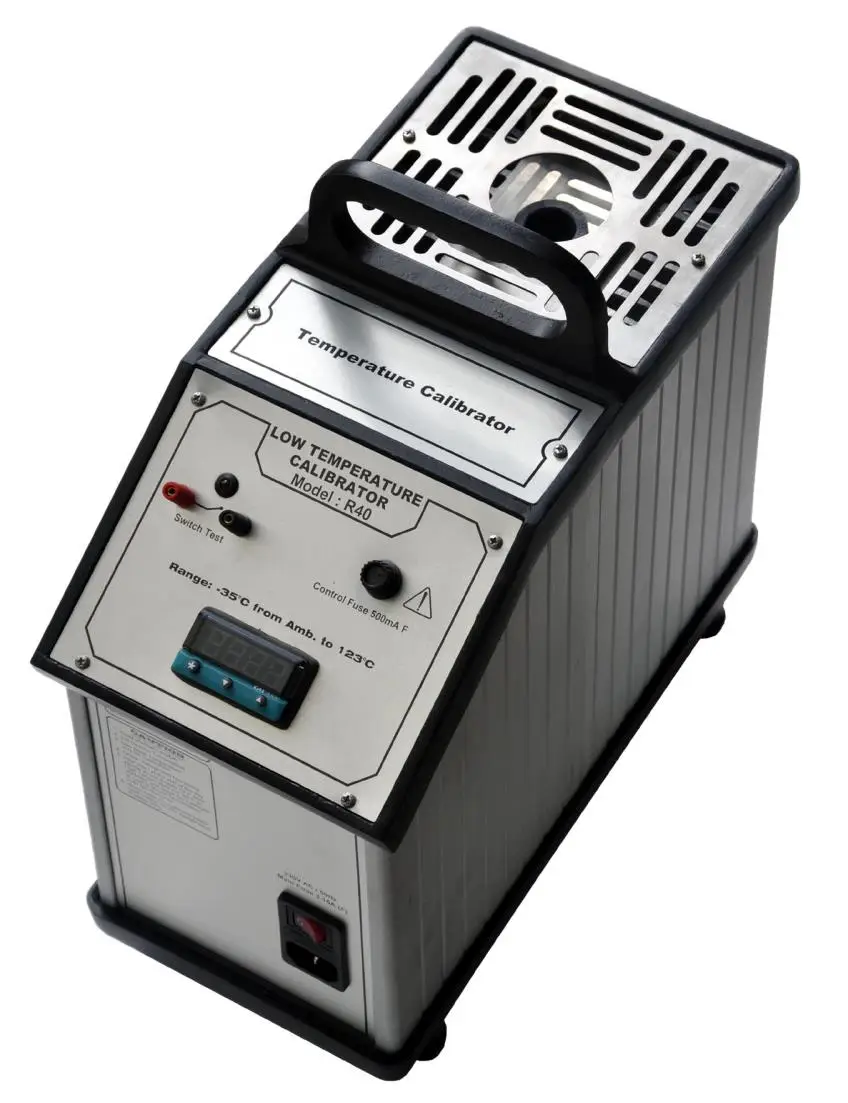
Temperature Calibrator Model R 40 is a simple, easy to use, compact, lightweight, Portable / Dry Block Type calibrator.
The calibrator can be used to calibrate virtually temperature sensor of size up to 19.5mm diameter. The versality of this calibrator helps to calibrate sensors from 3.5mm dia to 19.5mm dia.
Applications
Ideal for quick / fast Site Calibration of RTD’s, T/C’s, Bi-metal Thermometers, Temperature Switches, etc.
Features
- No dangerous liquids
- Calibration at site
- Rugged field use
- Fast and reliable
- Mains operated
- Over voltage protection
Certification
The Manufacturer certifies that the bath is a quality product and meets its intended use and satisfies the published specifications at the time of shipment.
Technical Assistance
Please contact the manufacturer if you require technical assistance.
Guarantee
1 year factory warranty.
This guarantee only cover manufacturing defects and becomes invalid if the instrument has been subjected to unauthorized intervention and / or use.
2.0 Safety Instructions

Read This Manual Carefully Before Using the Instrument
Please follow the instructions and procedures described in this manual. They are designed to allow you to get the most out of your calibrator and avoid any personal injuries and /or damage to the instrument.

Warning
- The calibrator must not be used for any purposes other than those described in this manual.
- The calibrator is designed for interior use only and should not be used in risk-prone areas, where vapour or gas leaks, etc, may constitute an explosive hazard.
- The calibrator is designed to offer a minimum of Basic Insulation only.

Caution – Hot Surface
This symbol is printed on the Printed Front Panel.
- Do not touch the front plate, the well or the Insert as the calibrator is heating up – this may be very hot.
- Do not touch the handle of the calibrator during use – it may be very hot.
Note….
The product liability only applies if the instrument is subjected to a manufacturing defect. This liability becomes void if the user fails to follow the maintenance instructions set out in this manual or uses unauthorized spare parts.
3.0 Setting up the Calibrator
3.1 Receipt of the Calibrator
When you receive the instrument….
- Carefully unpack, check the calibrator and the accessories.
- Check the parts against the list shown below. If any of the parts are missing or damaged, please contact us.
You should receive:
- Calibrator
- Mains Power Cord
- Inserts as per specifications, (or) to suit
- Tool for Removing Inserts
- Test Probes
- Instruction Manual
- Calibration Certificate
3.2 Preparing the Calibrator
Warning
- The calibrator must not be used in areas prone to explosive hazards.
- The calibrator must be kept clear within an area of 20 cm on all three sides and 1 meter on the front side of the calibrator.
- Never connect 24 V DC (max) voltage Switch Test terminals to voltage generating devices.
Note….
The Instrument must not be exposed to draughts.
When setting up the calibrator, you must….
Place the calibrator on an even horizontal surface in the spot you intend to use it.
Caution….
- Please ensure that the supply voltage is maintained at 220V±5%. If required, use a stabilizer in adverse voltage conditions.
- Do not use the instrument if the cooling fan located at the back of the instrument is out of order.
- Ensure a free supply of air to the fan grill located at the back of the instrument.
- Check that the earth connection for the instrument is present and attach the power cord.
- Insert the multihole inserts.
The calibrator is now ready for use.
3.3 Choice of Insertion Tube
Insertion tubes are selected on the basis of the diameter of the sensor to be calibrated.
3.4 Inserting the Sensors
Before inserting the sensors and switching on the Calibrator, please note the following important warning.
Warning
Never use heat transfer fluids such as silicone, oil, paste, etc. These fluids may penetrate the calibrator and cause damage or create poisonous fumes.
Caution….
- The well and the Inserts must be clean before use.
- Scratches and other damage to the Inserts should be avoided by storing the Inserts carefully when not in use.
- The Inserts must never be forced into the well. The well could be damaged as a result, and the Inserts may get stuck.
- Do not touch the well or the Inserts while the calibrator is heating up – they may be very hot.
- Do not touch the tip of the sensor when it is removed from the Inserts / well – it may result in burn injury.
- Do not touch the handle of the calibrator during use – it may be very hot.
4.0 Features of the Calibrator
4.1 Display Panel:
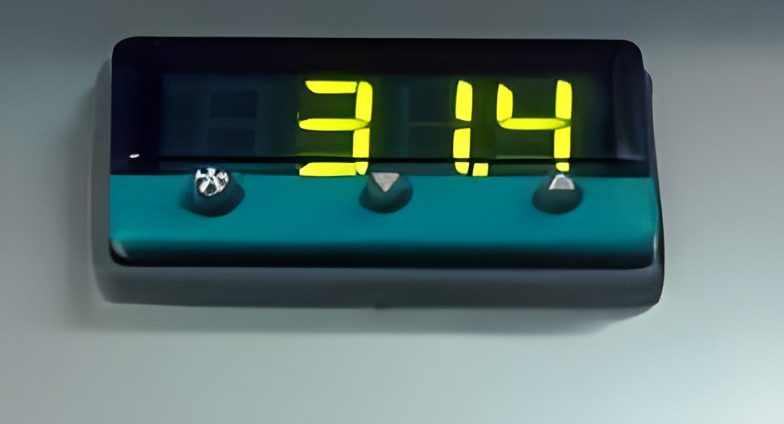
- Green Display: Process Temperature
- Green LED: Output Indicator (Flashing green bulleted square in the top left corner).
- Red LED: Temperature Over Range Indication, set for +10% of maximum range of the instrument. (Flashing red bulleted square in the bottom right corner).
5.0 Operating the Calibrator
5.1. Operational Procedure
a. Remove Calibrator out of its carrying case and place it such that the air intake at the bottom is not obstructed.
b. Connect the power cable to the Dry Block Calibrator.
c. Before applying power to the calibrator, determine the size (inner diameter) of the insertion tube to be used. For example if the user desires to calibrate check probe of ¼” outer diameter, use insertion tube of inner diameter ¼”.
d. Insert the sensors, which are going to be calibrated into the corresponding hole of the insert.
e. Switch on the instrument by Mains ON/OFF switch. Indicating RED Lamp will glow.
f. Set the required temperature in the PID Controller as follows.
g. Press “*” key and “▲”key simultaneously to increase the set temperature.
h. Press “*” key and “▼”key simultaneously to decrease the set temperature.
i. Allow the bath to stabilize at the Read temperature.
j. Connect test probe to the indicator and note down the readings of test probe.
k. Repeat steps g to j for other set of calibration points.
l. After calibration is over, set the Calibrator temperature to ambient.
m. After reaching the ambient temperature, switch off the power supply.
5.2 Switch Test
a) Connect the output of the Thermostat switch to the switch test sockets using the test probes supplied.
b) If the thermostat switch is OFF”Normally Closed” type the LED will glow and will stop glowing when the switch changes its state.
c) If the thermostat switch is OFF”Normally Open” type the LED will not glow initially and will glow when the switch changes its state.
6.0 Storing and transporting the Calibrator
Caution….
The following guidelines should always be observed when storing and transporting the calibrator. This will ensure that the instrument and the sensor remain in good working order.
Switch off the calibrator using the power control switch. Turning off the calibrator during the calibration process will not damage either the instrument or the sensor.
The following routine must be observed before the inserts are removed and the instrument switched off:
Over 100°C
If the calibrator has been heated up to temperatures above 100°C, you must wait until the instrument reaches a temperature at 10°C above ambient before you switch off.
If required, remove the insert from the calibrator using the tool for removing insert supplied with the instrument.
Caution….
- The sensor under test must always be removed from the calibrator after use. There is a risk that the sensor may get stuck if not removed.
The Inserts must be removed to avoid damage to the instrument if the calibrator is to be transported long distances
Warning
Never leave hot Inserts that may have been removed from the calibrator unsupervised – they may constitute a fire hazard.
If you intend to store the calibrator in the Packing Box after use, you must ensure that the instrument has cooled to a temperature at 10°C above ambient before placing it in the Packing Box.
7.0 Replacing the Fuses
Warning
The fuse box must not be removed from the Socket until the power cord has been disconnected.
The fuses should be replaced by same type and rating.
1. Locate the main fuse in the fuse box in the Socket.
2. Open the lid of the fuse box using a screwdriver.
3. Replace the fuse.
- 3.15 A (Mains Fuse)
If the fuse blow immediately after you has replaced them, the calibrator should be returned to the manufacturer for service.
7.1 Returning the calibrator for Service
When returning the calibrator to the manufacturer for service, please enclose the fully completed Information Form. Simply Fill up with necessary details on the following page and mail it to us. The calibrator should be returned in the original packing.
Note….
Manufacturer’s liability ceases if:
- Parts are replaced / repaired using spare parts which are not recommended by the manufacturer.
- Non-original parts are used in any way when operating the instrument.
Manufacturer‘s liability is restricted to errors that originated from the factory.
Service Information
"*" indicates required fields
8.0 Maintenance
8.1 Cleaning
Caution…
Before cleaning the calibrator, you must switch it off, allow it to cool down and remove all cables.
Users should/ must carry out the following cleaning procedures as and when required.
- The exterior of the instrument: Clean using water and a soft cloth. The cloth should be wrung out hard to avoid any water penetrating the calibrator and causing damage.
- The Insert: Must always be clean and should be regularly wiped using a soft lint free, dry cloth. You must ensure that there are no textile fibers on the Insert when it is inserted in the well. The fibers may adhere to the well and damage it.
- The Well: Must always be clean.
8.2 Adjusting and calibrating the instrument
You are advised to return the calibrator to Manufacturer or an accredited laboratory at least once a year for calibration.
9.0 Technical Specifications
All specifications are given with an ambient temperature of 25°C ±3°C.
General Specifications
Mechanical Specifications
Dimensions w x d x h - 155mm x 155mm x 260mm
Weight - 6.75 Kg Approx
Diameter/ Depth of insert - Ф19.0 mm / 100 mm
Power Supply
Line Voltage / frequency - 220 VAC ±5% / 50Hz
Power Consumption - 450 Watts
Power cord - 15A
Environment
Ambient operating temperature range - 15 – 40C
Storage Temperature Range - 10 –50C
Humidity Range - 35 – 65% RH
Protection Class - IP10
Readout Specifications
Temperature Units - °C
Resolution - 0.1°C
Thermal Specifications
Maximum Temperature - 123°C
Minimum Temperature - (-35°C) from ambient
Basic Accuracy - ±1 °C
Stability - ±0.2°C
Stabilization Time - 15 Minutes
Heating Time to max.(inclusive of Insert) - 10 minutes (Ambient to 123°C)
Cooling time (MIN) - 20 minutes
Insertion Wells - ¼” or to suit
Input Specifications
Switch Test Input
Internal Power Supply - 5V (Open)
Type of Connection - 2 mm Safety Socket
Load Range - LED On:0 – 10kΩ / LED Off :>100kΩ