
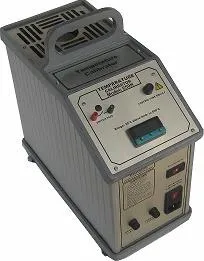
Temperature Calibrator 650H
1. Before You Start:
1.1 Symbols Used:
The following are the symbols used throughout the manual.
| S.No | Symbol | Description |
|---|---|---|
| 1 |  |
Read the user manual before operating the instrument. |
| 2 |  |
Warning- conditions that may pose hazards to the user. |
| 3 |  |
Hot surface- areas which are at high temperature. |
| 4 |  |
Electric shock – condition that may cause injuries to the User. |
| 5 |  |
Special information |
| 6 |  |
Caution-Condition that may damage the instrument. |
1.2 Safety Information:
Use the instrument only as specified in this manual. Otherwise, the protection provided by the instrument may be impaired. Refer to the safety information below and appearing throughout the manual.
A. Warnings
- This calibrator is designed for interior use only.
- Inspect the instrument for damage before each use.
- Do not use the instrument if it appears damaged or operates abnormally.
- If the instrument is used in a manner that is not in accordance with the equipment design, the instrument may be damaged.
- Do not place the instrument under a cabinet or other structure. Leave enough clearance to allow for safe and easy insertion and removal of probes.
- Do not use this instrument for any application other than calibration work. Any other use of the instrument may cause unknown hazards to the user.
- Do not operate the instrument near flammable materials.
- Calibration equipment should only be used by trained personnel.
- Completely unattended operation is not recommended.
- Do not drop the probe stems into the "well." This may cause a shock to the sensor.
- Follow all safety guidelines listed in the user manual.
B. Electrical Shock
- This instrument must be plugged into a 230 VAC, 50 Hz electrical outlet only (optional 115 V, 60 Hz).
- The power cord is equipped with a three-pin grounding plug for protection against electrical shock hazards.
- Plug the instrument directly into a properly grounded three-pin socket.
- The electrical receptacle must be installed in accordance with local codes and ordinances.
- Do not use an extension cord or adapter plug.
- If the instrument is supplied with user-accessible fuses, always replace the fuse with one of the same rating, voltage, and type.
- Always replace the power cord with an approved cord of the correct rating and type.
- If a main power supply fluctuation occurs, immediately turn off the instrument.
- Power bumps caused by brownouts could damage the instrument.
- Wait until the power supply has stabilized before turning the instrument back on.
C. Cautions:
- Always operate this instrument at room temperature between 10˚C and 40˚C (5˚C to 50˚C).
- Allow sufficient air circulation around the instrument by leaving at least 6 inches (15 cm) of clearance.
- Component lifetime can be shortened by continuous high-temperature operation.
- Use of this instrument at HIGH TEMPERATURES for extended periods requires caution.
- Do not turn off the instrument at temperatures higher than 100˚C. This could create a hazardous situation. Select a set-point below 100˚C and allow the instrument to cool before turning it OFF.
- The high temperatures present in dry-wells designed for operation at 300˚C and higher may result in fires and severe burns if safety precautions are not observed.
- Do not leave the inserts in the instrument for prolonged periods. This may cause damage due to the high operating temperature of the instrument.
- Do not slam the probe sheath into the well. This may cause a shock to the sensor and affect the calibration.
- This instrument and the thermometer probes are sensitive devices that can be damaged. Always handle these devices with care.
- Do not operate this instrument in an excessively wet, oily, dusty, or dirty environment.
- Do not use the instrument if the cooling fan located at the back of the instrument is out of order.
- Ensure a free supply of air to the fan grill located at the back of the instrument.
D. Hot Surface:
- Do not touch the ‘well’ access surface of the instrument.
- The block vent may be very hot due to the fan blowing across the heater block of the instrument.
- Do not touch the ‘Well’ or the Insert while the calibrator is heating up, as they may be very hot.
- Do not touch the tip of the sensor when it is removed from the Insert/‘Well’, as it may be very hot.
- The air over the ‘well’ can reach temperatures greater than 200˚C for high-temperature (400˚C and higher) dry-wells.
- Probes and inserts may be hot and should only be inserted or removed from the instrument when the instrument is set to temperatures below 50˚C.
- Use extreme care when removing hot inserts.
2. Introduction:
Temperature Calibrator (350H/H2-650H/H2) is used for calibrating RTD and Thermocouples. The LED in the front panel continuously shows the current ‘well’ temperature. Desired temperature is set in the cal control by holding * key and pressing / simultaneously. Proper use of the instrument will provide accurate calibration of temperature sensors.
3. Technical Specifications & Environmental Conditions:
| 3.1 Specifications | ||||
|---|---|---|---|---|
| Model | 350H | 350H2 | 650H | 650H2 |
| Range | 10°C above ambient to 350°C | 20°C above ambient to 650°C | ||
| Resolution | 0.1°C | 0.1°C | ||
| Accuracy | ±1°C | ±1.5°C | ||
| Stability | ±0.3°C | ±0.4°C | ±0.5°C | ±0.6°C |
| Stabilisation Time | 15 MINUTES | |||
| 'Well' Dia | 25mm | |||
| 'Well' Depth | 120mm | 200mm | 120mm | 200mm |
| Heating Time (To Max) | 20 minutes | 28 minutes | 20 minutes | 40 minutes |
| Cooling Time (To 100°C) | 45min | 60min | 60min | 180 min |
| Power Supply | 230VAC ± 10% / 50Hz 115VAC ± 10% / 60Hz (optional) |
|||
| Power Consumption | 500VA | 1100VA/1300VA | ||
| Switch Test Facility | 5VDC | |||
| Instrument Dimension | 160*350*325mm | 160*420*325mm | 160*350*325mm | 160*420*325mm |
| Instrument Weight | 7Kg | 8.5Kg | 11Kg | |
| Interchangeable Thermowell | ¼” & ½” Bore Dia standard. Other sizes optional. | |||
3.2 Environmental Conditions
This instrument should not be operated in an excessively dusty or dirty environment. The instrument operates safely under the following conditions:
- Operating Temperature: 15˚C to 40˚C
- Storage Temperature: 10˚C to 50˚C
- Ambient Relative Humidity: 40–75% RH
- Protection Class: IP10
3.3 Warranty:
The Manufacturer warrants these products to be free from defects in material and workmanship under normal use and service for a period of one year from the date of dispatch. This warranty extends only to the original purchaser and shall not apply to any product which, in manufacturer’s sole opinion, has been subject to misuse, alteration, abuse or abnormal conditions of operation or handling manufacturer’s obligation under this warranty is limited to repair or replacement of a product which is returned to manufacturer within the warranty period and is determined, upon examination by manufacturer, to be defective. If manufacturer determines that the defect or malfunction has been caused by misuse, alteration, abuse or abnormal conditions or operation or handling, Manufacturer will repair the product and bill the purchaser for the reasonable cost of repair.
4. Quick Start
4.1 Unpacking
Unpack the instrument carefully and inspect it for any damage that may have occurred during dispatch. If there is transit damage, notify the manufacturer immediately.
Verify that the following components are present:
- 350H/H2-650H/H2 Instrument
- Insertion Tube – ¼" & ½"
- Insert Removal Tool
- Switch Test Leads
- Power Cord
- Instruction Manual
- Test Leads
- Calibration Certificate
- RS232 Software (Optional)
- RS232 Cable (Optional)
- Software Manual (Optional)
- Software CD (Optional)
- Spare Fuses
- Warranty Certificate
4.2 SET-UP:
1. Switch ON the instrument
2. Set value should be zero.
3. Read value should show the ambient temperature.
4. Set any temperature in the display.
5. If the cal control shows the LED heating pulse, then we can make sure that the
Instrument is in working Condition.
Insertion tube diameter is selected according to the diameter of the sensor to be calibrated. The cal control will illuminate and the fan will begin quietly blowing air through the instrument after the illumination of the cal control. Sensor is inserted in the insertion tube and set the desired temperature in the display. Heater block gets heated and meets the desired set temperature with the help of PID controller.
5.parts & Controls:
5.1 General Assembly:
5.2 Display Panel:
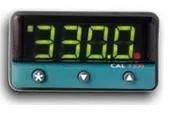
- Green Display: Process Temperature
- Green LED: Output Indicator (Flashing green square in the top-left corner)
- Red LED: Temperature Over-Range Indication, set to +10% of the maximum range of the instrument.
(Flashing red square in the bottom-right corner)
5.3 Heater Block:
The “Block” is made of copper for 650H/H2 and aluminum for 350H/H2 provides a relatively constant and accurate temperature environment in which the sensor that is to be calibrated is inserted. A 0.25 inch diameter ‘well’ is provided that may be used for sensors of that size or may be sleeved down with various sized multi-hole probe sleeves. Heaters surround the block assembly and provide even heat to the sensor. A high-temperature platinum RTD (Thermocouple for 650H/H2) is embedded at the base of the block assembly to sense and control the temperature of the block. The entire assembly is suspended in an air cooled chamber thermally isolated from the chassis and electronics.
6.0 Operating Procedure:
The calibrator can be operated in 230V/115V supply. It can be selected by using sliding switch located in the front panel of the instrument.
6.1 to Select the Unit (°c / °f):
a) Press the “▲ ▼” keys together and hold for 3 seconds.
b) Use the ▲ or ▼ key to locate the LEVEL function.
c) Press and hold the “*” key and use the ▲ or ▼ key to select LEVEL 2.
d) Use the ▲ or ▼ key to select “Unit” on the display.
e) Press and hold the “*” key and use the ▲ or ▼ key to select the required unit (°C or °F).
f) Press the ▲ ▼ keys together for 3 seconds to exit the setup.
6.2 to Select the Resolution:
a) Press the “▲ ▼” keys together to enter the setup mode.
b) Use the ▲ or ▼ key to select the LEVEL function.
c) Select LEVEL 2 by pressing the “*” and ▲ keys together.
d) Press the ▲ key to select “disp” on the display.
e) Press and hold the “*” key and use the ▲ or ▼ key to select the required resolution.
f) Press the ▲ ▼ keys together for 3 seconds to exit the setup.
6.3 Switch Test:
a) Connect the output of the Thermostat switch to the switch test sockets using the test probes supplied.
b) If the thermostat switch is of “Normally Closed” type, the LED will glow and will stop glowing when the switch changes its state.
c) If the thermostat switch is of” Normally Open” type, the LED will not glow initially and will glow when the switch changes its state.
7.0 Storing and Transporting the Calibrator:
Storing:
a) If the calibrator has been heated up to temperatures above 100°C / 212°F, you must wait until the instrument reaches a temperature at 10°C / 50°F above ambient before you switch off.
b) If required, remove the inserts from the calibrator using the tool for removing insertion, supplied with the instrument.
c) The Sensor under test must always be removed from the calibrator after use. There is risk that the sensors may become stuck if it is not removed.
Transporting:
Transporting:
a) Never leave the hot inserts that may have been removed from the calibrator unsupervised, which constitutes fire hazard.
b) Transport the calibrator to the packing box after use and ensure that the instrument has cooled to temperature 10°C / 50°F above ambient before placing it in the packing box.
8.0 Maintenance & Servicing:
Maintenance:
a) The calibration instrument has been designed with ease of operation and Simplicity of maintenance.
b) Proper care of the instrument requires very little maintenance. Avoid operating the Instrument in an oily, wet, dirty, or dusty environment.
c) If the outside of the instrument becomes soiled, it may be wiped clean with a damp Cloth and mild detergent. Do not use harsh chemicals on the surface which may Damage the paint.
d) It is important to keep the ‘well’ of the calibrator clean and clear of any foreign matter. Do not use fluid to clean out the ‘well’.
e) If a hazardous material is spilt on or inside the equipment, the user is responsible for taking the suitable steps to clean the equipment.
f) Do not use fluids to clean out the ‘well’. It may leak into the instrument and cause damage.
Servicing:
Socket Fuse:
a)Locate the main fuse in the fuse box in the socket.
b)Open the lid of the fuse box using a screw driver.
c) Replace the fuse with the same rating.
Transformer, Heater & Control Fuse:
a) Locate the Transformer Fuse, Heater Fuse and Control Fuse in the
Corresponding fuse holders marked in the equipment.
b) Open the Fuse holder cap by rotating it in anti clockwise direction.
c) Replace the fuse.
d) In case of any problem Return to the manufacturer for service, after filling the
service information form
9.0 Service Information:
"*" indicates required fields